A great event recap does not just show who was there. It makes people feel what it was like to be in the room. On November 16, 2026, PetaPixel published a hands-on guide from filmmaker Dmitry Koshutin on how he films and edits a high-energy festival sizzle reel, using footage from a music festival in Southern California as the example.
His advice is aimed at festival video, but almost all of it applies to the events we photograph in San Antonio and across Texas: galas, conferences, holiday parties, networking nights, and celebrations. Here is a plain-language breakdown of his process, plus how event hosts and photographers can use the same ideas to get a recap that people actually want to watch and share.
1. Film (and photograph) with the edit in mind
Koshutin’s biggest point is that he is always “editing in his head” while he shoots. Events are unpredictable, so he keeps scanning for dancing, action, and anything that grabs attention. He also looks for movement he can match from one clip to the next: if he pans left on one shot, he pans left again into the next one, or tilts up out of one scene and down into another.
The same thinking makes still photos stronger. When we cover an event, we are not just collecting faces. We are looking for the opening shot of the room, the moments of motion, the details, and the big reactions that will tell the story in order. If you are planning a recap reel or slideshow, that variety is what makes it work.
2. Look for color, shapes, and match cuts
At festivals, Koshutin hunts for repeating shapes, like spinning parasols, hoops, and other circles, so he can cut from one round object to another right on the beat. Those match cuts give a reel a lot of energy.
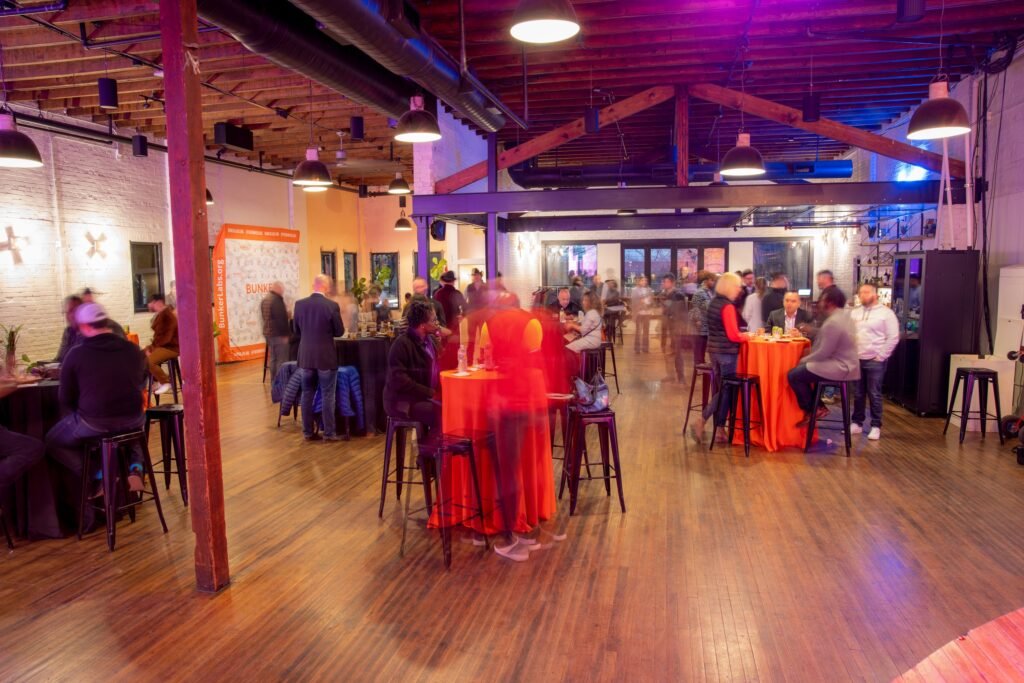
Corporate and social events have their own repeating elements: round cocktail tables, string lights, stage lights, glasses raised for a toast, logos on banners, and branded colors. In the photo above, the orange table linens and warm light show up again and again across the room, which is exactly the kind of visual thread a recap can follow.
3. Be respectful about who ends up on camera
Koshutin points out that many festivals include filming consent with the ticket, but he still approaches people with respect. If someone looks uncomfortable, puts a hand up, or turns away, he points the camera elsewhere, gives a quick apology, and leaves that clip out of the edit.
We follow the same rule. For private and corporate events, it also helps to tell guests ahead of time that photos and video will be taken, and to give your photographer a short list of anyone who should not be featured.
4. Pick the music first
Before he even opens the edit, Koshutin chooses the track, because a sizzle reel is driven by the music. He listens quickly through options, looks for the right mood and pacing, and prefers instrumental music so vocals do not compete with the footage. Then he trims the song to about a minute, ending on a natural transition, and marks each section of the song on the timeline so he can snap his cuts to it.
A simple tip for event hosts: make sure any music in your recap is properly licensed for how you plan to use it, especially if the video is going on your company website or social media.
5. Sort your selects into categories
This is the step that saves the most time. Koshutin runs through every clip, sets in and out points, and color-codes everything into groups: crowd shots, transition shots, general B-roll, walk-throughs of different areas, performers, stage wide shots, and stage close-ups.
It works just as well for photos. A recap slideshow or reel built from event photos usually needs:
- Establishing shots of the venue, signage, and the room filling up
- Crowd and energy shots of people mingling, laughing, and dancing
- Details like decor, food, centerpieces, and branded items
- Stage moments from wide angles and close-ups of speakers or performers
- The big moments, such as awards, toasts, countdowns, and grand entrances
6. Build the edit around the beat
Koshutin places his strongest transitions on the music cuts first, then fills the spaces in between. He matches the energy of the song, letting the piece build slowly and then burst when the beat drops, and he lets the story move from daytime into nighttime as the reel goes on. Actions on screen, like a fan flying up or a quick tilt to the stage lights, land right on the beat.
For events, following the real timeline is a natural structure: arrival, the room coming alive, the main program, and the high point of the night.
7. Add a few finishing touches, not a lot
His final step is adding a few motion transitions where they boost movement he already captured, like making a zoom or whip pan feel stronger. He keeps it to just a few. Overdoing effects is one of the fastest ways to make a recap feel dated.
How to get a better event recap in San Antonio
- Decide early if you want a recap. Tell your photographer and any video team before the event so they plan for motion, details, and wide shots, not just posed groups.
- Share the run of show. Your schedule tells us when the room will be at its most energetic, so we can be in the right place.
- Ask for a mix of photos. Wide shots, candids, details, and stage moments give an editor or social media team plenty to work with.
- Plan for fast sharing. A short recap posted while people are still talking about the event gets far more attention than one posted weeks later.
- Keep consent in mind. Let guests know cameras will be there, and flag anyone who should stay out of the recap.
A quick tip for photographers
If you want your still photos to carry the same energy as a sizzle reel, try a few slow-shutter frames. The photo at the top of this post was a 15-second exposure on our Nikon Z9 on a tripod at f/8 and ISO 64. The room stays sharp while the guests moving between tables blur into streaks, which says “this place was busy and alive” without showing anyone’s face up close. Mix a handful of those with your sharp candids and you have the makings of a great recap.
The takeaway
The best event recaps are planned before the first frame is captured. Shoot with the final story in mind, look for repeating shapes and colors, respect the people in front of the lens, let music set the pace, and stay organized. Whether your recap is a one-minute video or a photo slideshow, those habits are what turn a pile of files into something people want to watch twice.
Source: PetaPixel, “How to Film and Edit a High Energy Event Sizzle Reel” by Dmitry Koshutin (November 16, 2026).
Planning a conference, gala, holiday party, or celebration in San Antonio or anywhere in Texas? Reach out to Grey Bug Photography, or see how we work with planners on our For Planners page.