Nikon has set a date for the biggest update yet to its ZR cinema camera. Firmware version 2.00 arrives as a free download on the evening of November 23, Eastern time (November 24 in Japan), and it is aimed squarely at people who shoot video in dark rooms, grade their footage, and need clients to see what they are getting while the camera is rolling. That describes a lot of event video work, so here is what is coming and what it means if you hire or work as an event shooter in San Antonio.
What Nikon ZR firmware 2.00 adds
Nikon outlined the update earlier this month, and outlets including Newsshooter, Fstoppers and Imaging Resource have covered the details. In plain language:
- RED color in smaller files. H.265 recording gains Log3G10 gamma with REDWideGamutRGB. Before, you needed the much larger R3D NE format to get RED color science on the ZR.
- Noise reduction you can choose. High ISO noise reduction becomes selectable in four levels (Off, Low, Normal, High) when shooting Log3G10 or N-Log in H.265, and for ProRes 422 HQ in N-Log. Fstoppers notes that some early ZR users felt H.265 footage looked soft, which many blamed on heavy in-camera noise reduction.
- Less flicker in the shadows. Nikon says new processing suppresses frame-to-frame changes in black level, which reduces the flicker that can show up in low light and dark parts of the frame.
- Focus peaking with a LUT in R3D NE. You can now see focus peaking while a 3D LUT is applied during R3D NE recording, a big deal for manual-focus cinema lenses.
- A graded picture on the external monitor. A 3D LUT can now be sent out over HDMI, so a director or client on an external screen sees a normal-looking image instead of flat log footage.
- More custom controls. ISO, exposure compensation, white balance and color temperature can be assigned to the command dials, and an Fn button can flip the screen between the LUT view and the flat log view.
One thing it does not include: open gate recording and anamorphic desqueeze are still planned for a later update in 2027, according to Nikon.
Why these changes matter at real events
1. Dark venues are the normal case
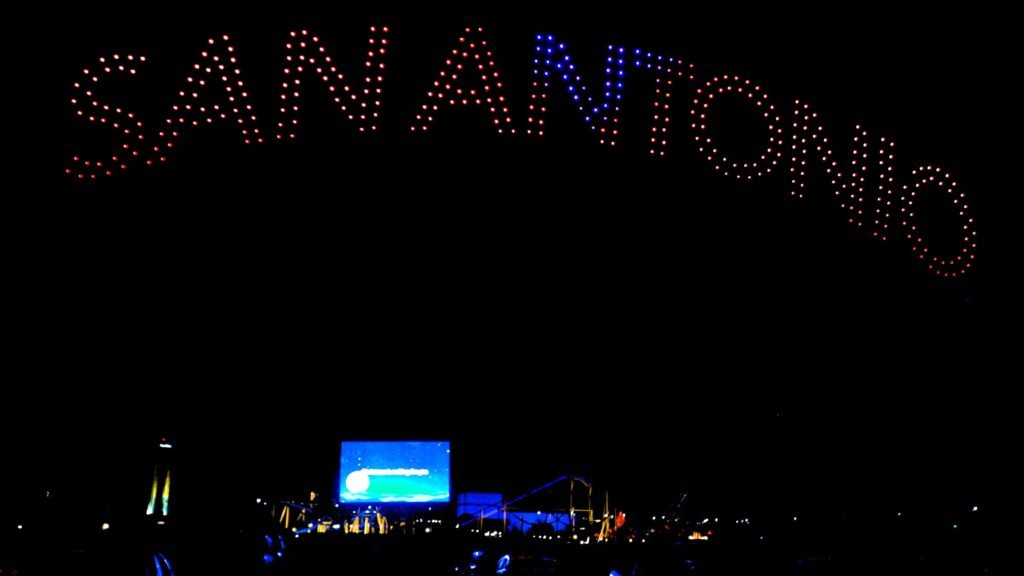
Galas, award dinners, concerts, holiday light shows and drone shows like the one above all happen in low light. That is where noise reduction choices and shadow flicker show up first. Being able to turn noise reduction down (and clean it up later in editing, if needed) helps keep texture in faces and fabrics instead of that smeared, waxy look. If you want the photo side of this, our post on why ISO doesn’t create noise explains how exposure, not the ISO number, drives most of the grain you see.
2. LED screens and stage lights are tough on video
Look at the frame at the top: pinpoint drone lights, a bright LED screen and mostly black sky. Scenes like that push a camera’s shadows hard, and any frame-to-frame change in black level shows up as a pulse in the dark areas. Nikon’s new processing targets exactly that kind of flicker. It will not fix every problem (LED refresh rates and shutter speed still matter), but less shadow flicker means a cleaner recap video.
3. Clients want to see the look on set
Log footage looks gray and flat until it is graded. Sending a LUT over HDMI means a marketing manager watching a monitor sees roughly the final look, which builds confidence and cuts down on “is it supposed to look like that?” questions during an interview or brand shoot.
4. Smaller files mean faster turnaround
Getting RED-style color in H.265 instead of only in R3D NE means less storage and faster offloads. For multi-day conferences or a same-day event sizzle reel, smaller files can be the difference between delivering tonight and delivering next week.
Our take as Nikon Z9 and Z8 shooters
We do not shoot the ZR. Grey Bug has worked with the Nikon Z9 and Z8 since launch for events and headshots. But Nikon firmware updates have been a big part of owning those bodies, and the same rules apply to any camera update:
- Never update the night before a job. Update during a quiet week, then shoot a test session before the camera goes to a client event.
- Save your settings first. Save your menu settings to a memory card before updating so you can restore them if anything resets.
- Use a full battery and an official download. Install only firmware from Nikon’s own download center. We covered why we stay away from unofficial patches in our post on the unofficial Nikon Z8 firmware hack.
- Read the release notes. New features sometimes move menu items or change defaults, like noise reduction levels. Check them before you trust your old setup.
- Test in your worst light. If a fix targets low-light flicker, test it in a dark room, not your bright office.
Gear links
Shopping for a Nikon video body or support gear? Here are current listings:
- Nikon ZR cinema camera: Buy at Adorama
- Cages and rigging for the Nikon ZR: Buy at Adorama
- Nikon Z8, our hybrid photo and video workhorse: Buy at Adorama
Disclosure: some links in this post are affiliate links, which means Grey Bug Photography may earn a small commission if you buy through them, at no extra cost to you.
What event hosts can ask their video team
- Have you tested your camera’s current firmware in a venue as dark as ours?
- Can we see a graded preview on a monitor during interviews or key moments?
- How do you handle LED screens and stage lighting so the video does not flicker?
- How soon can we get a short recap clip after the event?
Comparing cinema-style cameras for event and brand video? See our look at the Panasonic LUMIX SHX1 box cinema camera too.
The takeaway
Nikon ZR firmware 2.00 is a practical update: smaller files with RED color, control over noise reduction, less shadow flicker in dark scenes and better monitoring for clients. For event and brand video in San Antonio, those are the details that show up in the final edit. And whatever camera your crew uses, the smartest firmware habit is the simplest one: update early and test before the big day.
Sources: Newsshooter, November 16, 2026 (updated November 18); Fstoppers, November 18, 2026; Imaging Resource; PetaPixel, November 16, 2026.
Planning a conference, gala, holiday event or brand video in San Antonio or anywhere in Texas? See our event photography and headshot photography pages, or contact Grey Bug Photography to talk about coverage.